Improvements
- Planning: Red highlighting is now also displayed on visits that have been scheduled outside the visit time specified on the customer card (AM and PM).
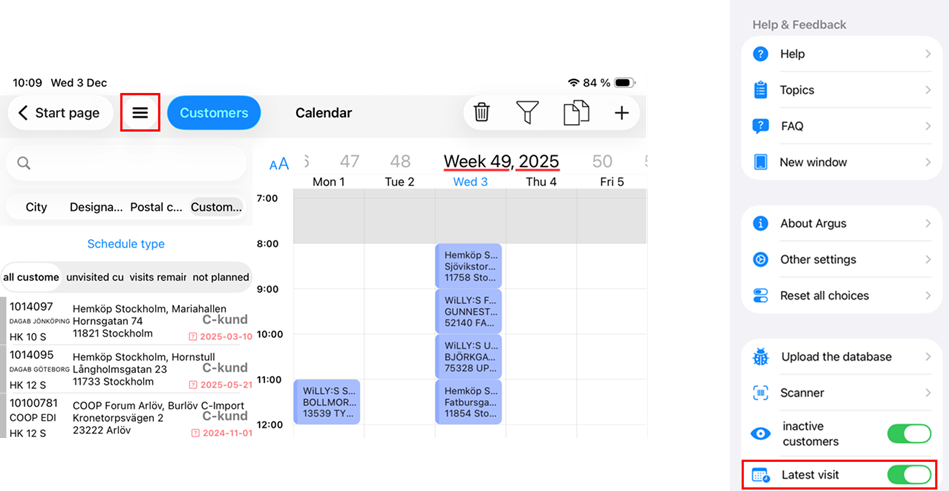
- Planning: You can now choose to display the date of the most recent visit instead of the remaining number of visits. This can be configured via the hamburger menu.
The date of the most recent visit is marked with different colors. Customers who do not have a visit frequency and have not yet been visited are shown without information. Only when you schedule a visit will they be shown as having one remaining visit. After the visit has been completed, the customer will receive a registered visit date. Note: To apply the change, exit the planning view and open it again.
- Green: The correct number of visits has been completed according to the visit frequency.
- Red: Visits are missing compared to the visit frequency.
- Black: No visit frequency is used, or the customer is missing a visit frequency
Distribution/Listing
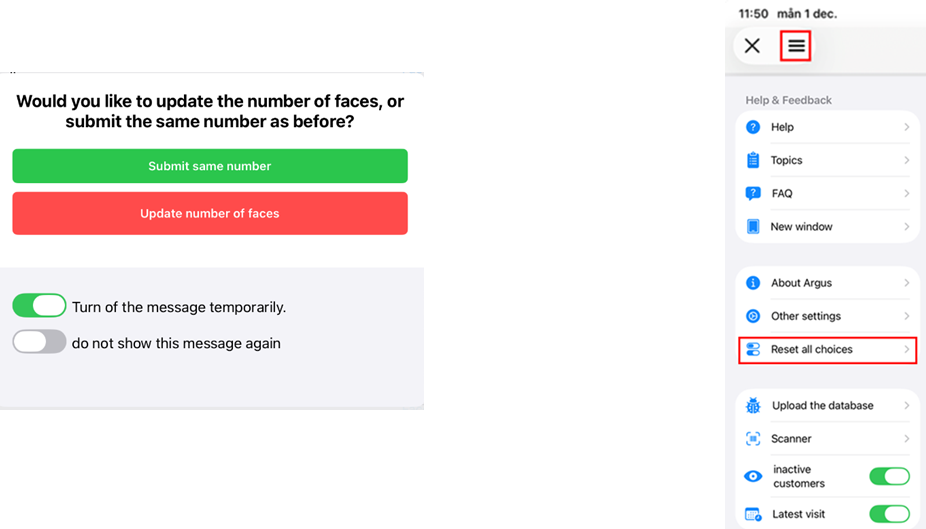
We have restored the functionality that allows you to mark the current distribution without changing the number of facings. When you click in the facings field, a dialog box appears where you can choose between two options:
Submit same number
The number of facings remains unchanged but is marked as checked.
If you want to add more facings, click the facings field again.
Update number of faces
The new number of facings will be updated at once.
Message Settings
Turn of the message temporarily (default)
This means your selection applies for the entire current registration session, and the dialog box will not appear again.
When you leave Distribution/Listing and return, the options will be shown again.
Do not show this message again
If you select this option, the dialog box will never appear again.
To reset this setting, open the hamburger menu and choose “Reset all choices.” This is updated after you leave the listing view and enter it again.
Bug Fixes
- Planning: When you tried to move a scheduled visit sideways, the entire calendar shifted. This bug has now been fixed.
- Planning – Filters: An issue has been resolved where the top selections in the filter list did not display correctly on iPad. The list incorrectly moved with the scrolling, making it difficult to select options.
- Planning: The text for planning types has been made clearer.
- Planning: Argus crashed when a customer was selected and dragged without being dropped onto any time slot in the calendar. This has been resolved.
- Planning: Fields such as “Not visited” were shown as transparent and blended with the customer list. This has now been corrected.
Was this article helpful?
That’s Great!
Thank you for your feedback
Sorry! We couldn't be helpful
Thank you for your feedback
Feedback sent
We appreciate your effort and will try to fix the article