Login with Single Sign On (SSO)
Single Sign-On (SSO) makes login easier and more secure for the user, since there is no need to remember an additional password. It also makes it easy to centrally use multi-factor authentication (MFA), which increases security without negatively affecting the user experience. Administration is simplified because user accounts are managed in one place. When a user leaves the organization, access is automatically disabled in all connected systems, reducing the risk of unauthorized access.
Argus supports SSO via OIDC (OpenID Connect), and it is possible to log in using Google or Azure Entra ID. In this document, Argus refers to Argus Cloud and the iOS app.
SSO is used solely for authentication and user identification. No additional information (such as groups or roles) is retrieved from the user’s SSO profile.
Enabling SSO for a organisation
- Before SSO can be enabled, Argus must first be set up with the users who should be able to log in. This is because each user must be linked to the correct installation and database. Users must also be assigned access rights and roles in Argus before they can log in. To simplify the login process, the login method is configured in advance, so users do not have to select it during login, which reduces the risk of errors.
- For a user to be able to log in via SSO, an administrator for the organization must approve that Argus is allowed to perform authentication and retrieve information about the user. The easiest way to do this is for a user to attempt to log in. The flow is as follows:
- The user is presented with a dialog stating that administrator approval is required to log in.
- The user requests access
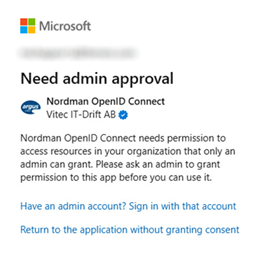
- A request is sent to the organization that the user belongs to. As long as it isn’t approved the user will be met with this message if they try to log in.
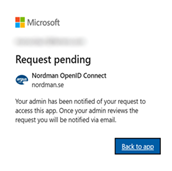
- An administrator for that organization can approve the request.
- After approval, the user should be able to log in to Argus using SSO.
As an alternative, an administrator can grant access directly by creating the consent themselves. This is done by visiting the following link:
https://login.microsoftonline.com/common/adminconsent?client_id=8121e0b7-f1b1-4f9c-8fd1-faf2ffb70d3c
However, this approach carries a higher risk that the administrator grants access to the wrong organization, in which case the user will not have permission to log in.
Technical information
Protocol | OIDC (OAuth 2.0) |
Application name | Nordman OpenID Connect |
Azure Client ID / Application ID | 8121e0b7-f1b1-4f9c-8fd1-faf2ffb70d3c |
Callback / Redirect URL | flutter (Argus Cloud) |
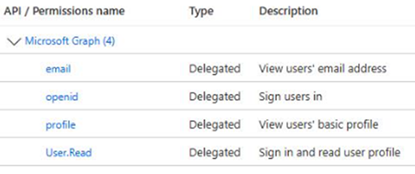
Scope / API Permissions | openid, profile, email, User.Read
|
RP-initiated logout | Not support |
Secret Key | None |
Geoblock | Argus only supports login from Europa (except Russia, Belarus), Cyprus, Greenland, Canada, Thailand, USA |
Troubleshooting
The user cannot log in even though an administrator has granted access
The most likely reason is that the user belongs to an organization or group that has not been granted access to Argus. Verify that access to Argus is assigned to the same organization or group that the user belongs to.
Some users can log in, but others cannot
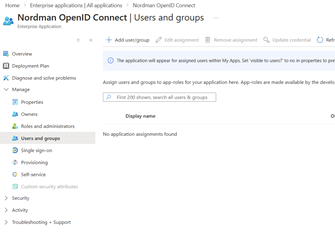
In Azure Entra ID, there may be restrictions on which users or groups are allowed to use SSO for the application Nordman OpenID Connect.
If such filtering is in place, ensure that all relevant users are granted access to the application.
The user receives the error “URL too long”
The login cookie has become corrupted or too large. Delete all cookies in the browser for nordman.se and then navigate to the start page again.
Access Denied
If this error appears, the user has successfully authenticated with the SSO provider, but Argus cannot find the user in the system. This is usually caused by one of the following:
- The user's email address in Argus does not exactly match the email address in Entra ID (Microsoft) or Google.
- The user does not have an email address configured with their SSO provider. This must be verified by one of the user's administrators.
Was this article helpful?
That’s Great!
Thank you for your feedback
Sorry! We couldn't be helpful
Thank you for your feedback
Feedback sent
We appreciate your effort and will try to fix the article