The Volume Analysis is a sales analysis based on orders placed in Argus or POS data, if this data is imported into Argus.
The purpose of the analysis is to evaluate sales development by product, product group, chain, customer/store, and district/sales representative.
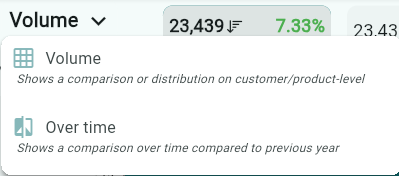
The Volume Analysis can also be viewed as volume over time by selecting the arrow next to the Volume heading and changing the view to Over Time.
The Volume Analysis / Sales Analysis can be found under the main heading Analytics / Volume Analysis.
Data Sources
The data sources for this analysis are placed orders or imported POS data.
There are extensive filtering options available via the filter icon.
A particularly popular feature is the ability to use POS data as the data source and filter by a specific campaign to determine whether the campaign weeks generated additional sales.
What the Analysis volume Shows
Sales Volume per Unit
The number of products sold is presented in:
Sales unit (KRT – cartons)
Converted KRT (sales units such as pallets converted into loose cartons)
Consumer units (pcs)
Weight in kilograms (kg)
Comparison with Comparison Period
The analysis shows changes in sales both in absolute numbers and as a percentage (Index %).
An information panel displays detailed information for the selected item.
Results – Sold Products by Dimension
Sales by customer/store
Sales by product
Sales by district/sales representative
Graphical Comparison
When a comparison is selected, the development is shown graphically against the corresponding period in the previous year, unless the comparison period is actively changed.
Select the unit you want the graph to display:
KRT
Converted KRT
Consumer units
Weight in kg
How to Interpret the sales volume AnalysisGreen bars show the volume for the current period.
Red percentage values (Index %) indicate a decrease compared to the previous sales cycle, while green values indicate an increase.
If a product has a high volume but a red index, it means that it is still selling well but has declined compared to the previous cycle.
If a district shows zero sales while the previous cycle had sales, it is displayed as –100%. This may indicate lost distribution or that no orders were registered.
Usage Examples of sales volume analysis
Store follow-up: Check whether volume for a specific customer has increased or decreased compared to the previous period.
Product sales follow-up: Identify which products are growing or declining the most.
District / sales representative follow-up: Monitor sales performance and determine whether differences between districts are due to activities, campaigns, or external factors.
Sales / Volume Over Time
The purpose of this view is to show the development of sales volume (order data or POS data) week by week over a selected period, compared with the corresponding period in the previous year.
The data sources are orders placed in Argus or imported data such as POS data.
What the Analysis over time shows
Sales unit (KRT): Number of cartons according to the sales unit
Converted KRT: Volume where larger packages (e.g. pallets) are converted into loose cartons
Consumer unit (pcs): Number of units sold
Weight in kg: Volume expressed in kilograms
Value: Sales value in local currency
Discount: Total discount for the period
Each metric also shows the percentage change compared with the corresponding period in the previous year.
The Graph
The graph displays sales week by week during the selected period.
Dark line: Current period
Light line: Corresponding period in the previous year
The difference between the lines clearly illustrates whether sales have increased or decreased over time.
How to Interpret the Analysis over time
If the current line is below last year’s line → sales have decreased.
If the current line is above last year’s line → sales have increased.
A strongly deviating index (e.g. –55%) indicates that volume is significantly lower than during the same period last year.
The selected unit (KRT, converted KRT, consumer unit, weight, or value) determines what the graph visualizes.
Usage Examples of analysis over time
Trend analysis: Determine whether volume is increasing or decreasing compared to the previous year.
Seasonal comparisons: Identify periods when sales are typically higher or lower.
Effect of activities: Evaluate whether campaigns or other activities have generated clear volume peaks in the current period.
Planning: Use historical trends as input for future forecasting.
If you select Comparison, the chosen unit is displayed graphically alongside the corresponding period of the previous year.
Select the unit you want the graph to display by checking the box.
(Sales Units (CRT), Converted CRT Quantity (Display units converted to cartons), Consumer Units (pcs), and Weight in KG)
Was this article helpful?
That’s Great!
Thank you for your feedback
Sorry! We couldn't be helpful
Thank you for your feedback
Feedback sent
We appreciate your effort and will try to fix the article